
To do keyword research for a new website, start by listing your core topics, expand them into specific long tail phrases using Google’s autocomplete and free tools like AnswerThePublic, filter for low-competition keywords with clear search intent, and organize the winners into a content plan of 20 to 30 articles. New sites should target easy keywords first and build up to competitive ones over time.
Starting keyword research for a brand-new site feels different from researching for an established one. You have no traffic data, no authority, and no backlinks. This workflow is built for exactly that situation: zero budget, zero data, and a site Google barely knows exists.
In This Article
- Why Is Keyword Research Different for a New Website?
- What Do You Need Before You Start?
- How Do You Do Keyword Research for a New Website, Step by Step?
- Step 1: List Your Core Topics
- Step 2: Turn Topics into Questions and Phrases
- Step 3: Check Search Intent for Each Phrase
- Step 4: Filter for Low Competition
- Step 5: Verify There’s Enough Search Volume
- Step 6: Group Keywords into Topic Clusters
- Step 7: Build Your First Content Plan
- What Does a Keyword Research Checklist Look Like?
- What Should You Do After Publishing?
- Frequently Asked Questions
- How many keywords should a new website target?
- Can a new website rank on Google without backlinks?
- How long does it take for a new website to rank?
- Should a new website target high-volume keywords?
- What is the biggest keyword research mistake new sites make?
Why Is Keyword Research Different for a New Website?
An established site can target competitive keywords because it has domain authority and backlinks working for it. A new site has neither, so the rules change:
- You can’t win hard keywords yet. Targeting competitive terms in month one is wasted effort. Easy keywords first, harder ones later.
- You have no Search Console data. You can’t see what you’re already ranking for, so you research from scratch using competitor and SERP analysis instead.
- Every article needs to count. With limited time and budget, you need keywords where one good article can have a realistic shot at page one.
The good news: new sites can absolutely get traffic in their first months. You just have to pick fights you can win.
What Do You Need Before You Start?
Not much. Here’s your starter kit:
- A spreadsheet. Google Sheets works fine. You’ll track keywords, volume, difficulty, intent, and the page you’ll target them with.
- One free keyword tool. AnswerThePublic, Google Keyword Planner, or Ubersuggest’s free tier — pick one and learn it well. Tool menus and labels change over time, so look for the equivalent option if a label has moved.
- An incognito browser window. For honest SERP checks without your search history skewing results.
- Your niche defined. You should be able to finish this sentence: “My website helps [audience] do [thing].” If you can’t, nail that down before researching.
That’s it. No paid tools required for your first content plan.
How Do You Do Keyword Research for a New Website, Step by Step?
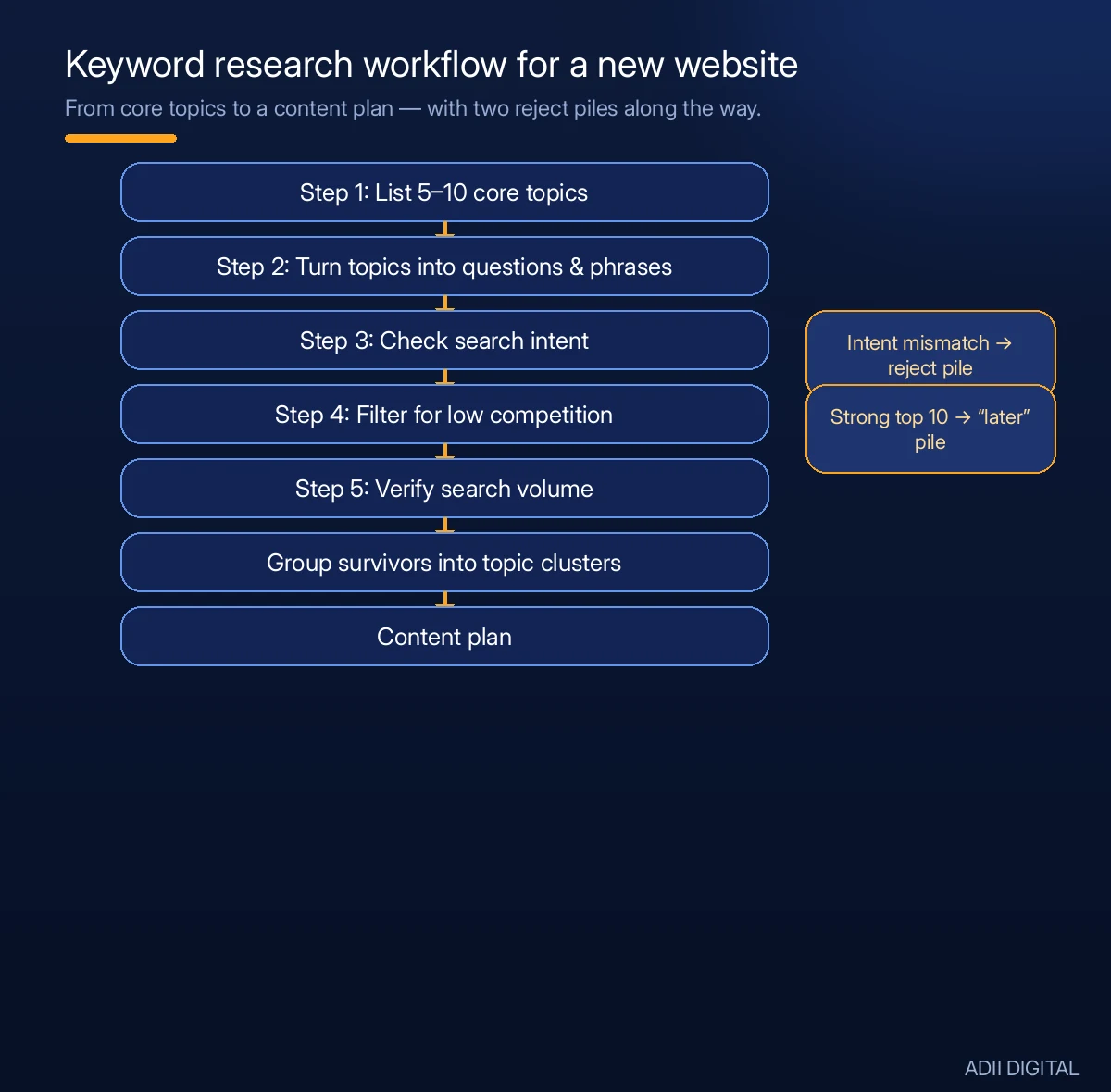
Step 1: List Your Core Topics
Write down 5 to 10 broad topics your site covers. These are your seed topics, not keywords yet. A site about home coffee brewing might list: brewing methods, coffee beans, grinders, espresso, cold brew, latte art, equipment care.
Keep them tied to what you’ll actually publish about. Broad is fine at this stage.
Step 2: Turn Topics into Questions and Phrases
For each core topic, brainstorm the questions a beginner would ask. Then expand with free methods:
- Type each topic into Google and save every autocomplete suggestion.
- Expand every “People also ask” question and copy the related searches.
- Run each topic through AnswerThePublic and save the question results.
- Browse Reddit and niche forums for your topics and note the exact wording people use.
Aim for 30 to 50 raw phrases per core topic. You’ll end up with a few hundred — that’s normal.
Step 3: Check Search Intent for Each Phrase
Before you check difficulty or volume, make sure the keyword fits your site. Google each phrase and look at the top results:
- Are they blog posts, product pages, videos, or forum threads?
- Does the content match what you would write?
- Is the intent informational, commercial, or transactional?
If the top results are product pages and you’re planning an informational blog, that keyword is a mismatch for you right now. Mark it and move on.
Step 4: Filter for Low Competition
This is the most important step for a new site. For your shortlisted phrases:
- Check a free difficulty score if you have lookups available.
- Do the manual SERP check. Search in incognito and study the top 10. Green lights for a new site: forum threads, Quora answers, thin or outdated articles, small blogs, and user-generated content ranking on page one.
- Red flags: Wikipedia, major news sites, big brands with polished guides, and results pages full of high-authority domains.
Be honest here. If the top 10 looks strong, the keyword goes in your “later” pile, not your “now” pile.
Step 5: Verify There’s Enough Search Volume
You don’t need big numbers. For a new site, keywords with roughly 50 to 500 monthly searches are a reasonable sweet spot — enough traffic to matter, low enough competition to win.
Skip anything with effectively zero searches unless it serves a strategic purpose (like supporting a topic cluster). And don’t obsess over exact volume numbers from free tools — treat them as rough estimates, not gospel.
Step 6: Group Keywords into Topic Clusters
Now organize. Group related keywords under one main topic:
- Pillar topic: “home coffee brewing” — your main guide.
- Cluster articles: “best coffee beans for French press,” “how to clean a coffee grinder,” “French press vs pour over.”
Each cluster article targets one primary keyword and naturally covers several related phrases. This structure helps Google understand your site’s expertise and helps your pages support each other through internal linking.
Step 7: Build Your First Content Plan
Pick 20 to 30 keywords for your first batch of articles. Prioritize:
- Lowest competition first.
- Clear informational intent (guides, how-tos, comparisons).
- Topics you can genuinely write well about.
Schedule them in a realistic order — maybe one or two articles per week. Your first articles should be the easiest wins; harder keywords go later in the calendar as your site gains traction.
What Does a Keyword Research Checklist Look Like?
Since this is a lot to remember, here’s a condensed checklist you can run for every keyword. Many site owners keep a version of this as a downloadable reference next to their content calendar — consider making one for your own workflow:
- Keyword written down with its core topic.
- Search intent identified (informational, commercial, transactional).
- Top 10 results reviewed in an incognito window.
- Competition judged winnable for a new site (forums, thin content, or small blogs ranking).
- Some measurable monthly search volume confirmed.
- Assigned to a specific article in the content plan.
- Grouped with 3-5 related phrases the same article can cover.
- Primary keyword placed in the planned title and URL slug.
Run every keyword through this list before you write. It takes only a few minutes and saves you from publishing articles that never had a chance.
What Should You Do After Publishing?
Keyword research doesn’t end when you hit publish. For a new site, the follow-up matters as much as the research:
- Give it roughly 2 to 3 months. New pages take time to rank. Don’t judge an article after two weeks.
- Check Google Search Console. Once it’s set up, the Performance report shows which queries your pages actually rank for — often including long tail phrases you didn’t target.
- Double down on what’s working. If a topic cluster starts gaining impressions, write more articles around it.
- Refresh underperformers. If a page ranks on page two or three, improve it: better headings, more depth, clearer answers. Small upgrades can push it onto page one.
- Repeat the research quarterly. Your site gains authority over time, so keywords that were too hard in month one may be winnable by month six.
Frequently Asked Questions
How many keywords should a new website target?
Start with 20 to 30 keywords for your first content plan — roughly one primary keyword per article. That’s enough to build topical authority in your niche without spreading yourself thin. You can expand the list once the first batch is published and gaining traction.
Can a new website rank on Google without backlinks?
Yes, for low-competition keywords. If the top results for your target phrases are thin pages, forums, or outdated articles, a thorough, well-structured page can outrank them on content quality alone. Backlinks become necessary as you move into more competitive keywords.
How long does it take for a new website to rank?
Most new pages typically take roughly 2 to 6 months to reach their full ranking potential, depending on competition and how often Google crawls your site. Low-competition long tail keywords tend to rank faster. Publish consistently and give each article time before judging it.
Should a new website target high-volume keywords?
Not at first. High-volume keywords are almost always highly competitive, and a new site won’t outrank established pages for them. Start with lower-volume, low-competition keywords to build traffic and authority, then work your way up to bigger terms.
What is the biggest keyword research mistake new sites make?
Targeting keywords based on volume alone without checking competition. A keyword with 10,000 monthly searches is unlikely to pay off for a new site if the top 10 results are all major brands. Always check who’s ranking before you commit to writing.
Keyword research is the foundation of everything that follows — get it right and every article works harder. If you’d like a professional to build your keyword strategy and content plan, explore our digital marketing services at https://adiidigital.com/services/.