
An AI receptionist is a phone-answering service powered by artificial intelligence. It picks up every call to your business, talks to the caller naturally, takes messages, books appointments, and answers common questions — 24 hours a day, 7 days a week. For a small business, it means never missing a call again, at a fraction of the cost of hiring a full-time receptionist.
In This Article
- What Does an AI Receptionist Actually Do?
- How Does an AI Receptionist Work?
- Why Do Small Businesses Use an AI Receptionist?
- How Much Does an AI Receptionist Cost in 2026?
- AI Receptionist vs. Human Receptionist vs. Voicemail
- Which AI Receptionist Should You Pick?
- What Are the Honest Downsides of an AI Receptionist?
- How Do You Set Up an AI Receptionist?
- Frequently Asked Questions
- Will callers know they are talking to an AI?
- Can an AI receptionist book appointments for my business?
- What happens if the AI cannot answer a caller’s question?
- Is an AI receptionist better than a human receptionist?
- How long does it take to set up?
- Do I need a new phone number for an AI receptionist?
- The Bottom Line on AI Receptionists
That is the short version. In this guide, we walk through the whole thing in plain English: what an AI receptionist for a small business actually does, how it works behind the scenes, what it costs in 2026, where it falls short, and how to pick one that fits your business.
Quick answers
What is an AI receptionist for a small business? An AI receptionist for a small business is a virtual phone assistant that answers every call instantly, day and night. It greets callers by your business name, takes messages, books appointments, answers common questions, and sends you a summary after each call — so no customer ever reaches voicemail.
How much does an AI receptionist cost? Most small businesses pay roughly $30 to $250 per month for an AI receptionist, depending on call minutes and features such as calendar booking. Basic plans suit light call volume, while busier businesses pay more for extra minutes and transfers. That is still far less than hiring a full-time receptionist.
What Does an AI Receptionist Actually Do?
An AI receptionist is a virtual phone assistant. It answers calls on a real phone number, speaks to callers in a natural voice, and handles the routine parts of a phone conversation. Here is what a typical one does:
- Answers every call instantly. No ringing for ten seconds while you run to the phone. No voicemail that nobody returns.
- Takes messages. It asks the caller’s name, the reason for calling, and sends you a summary by text or email.
- Books appointments. It checks your calendar, offers open slots, and books the caller in — just like a human receptionist would.
- Answers common questions. Your hours, your address, your prices, your services. You tell it the answers once, and it repeats them correctly every time.
- Transfers urgent calls. If someone has an emergency or asks for you by name, it can forward the call to your mobile.
- Screens spam and sales calls. It can spot robocalls and cold callers, so you only get interrupted for real customers.
- Captures lead details. It asks for the caller’s name, number, and what they need, so every enquiry lands in your inbox with the context you need to follow up.
Think of it as a receptionist who never sleeps, never calls in sick, and never forgets to ask for the caller’s phone number. The phone is only one channel, though — many small businesses pair an AI receptionist with an AI chatbot on their website so visitors and callers both get an instant answer.
How Does an AI Receptionist Work?
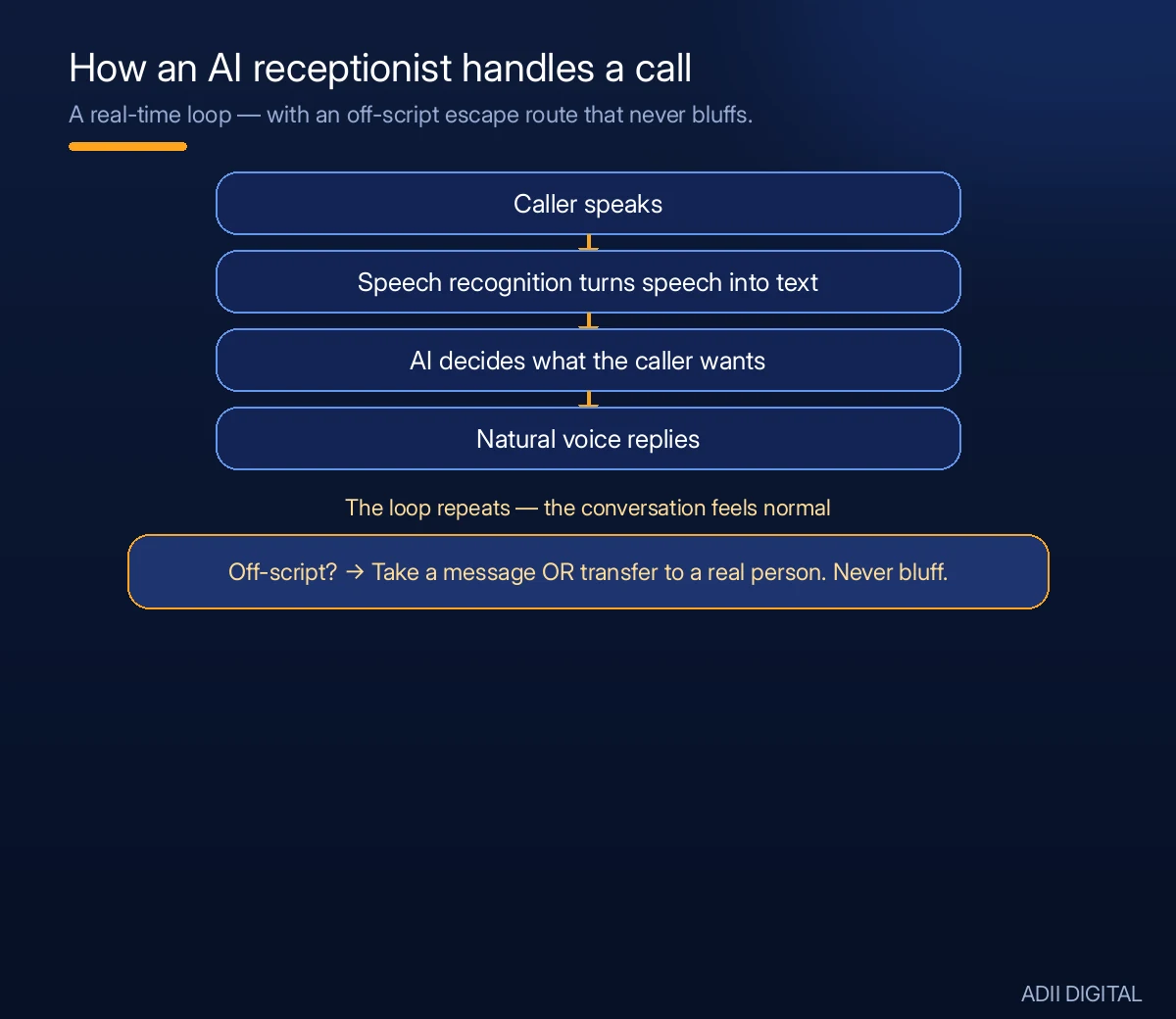
The technology sounds complicated, but from your side it is simple. Here is the process:
- You get a business phone number from the AI receptionist provider, or you forward your existing number to them.
- You tell the system about your business. Your name, your services, your hours, your prices, the questions customers ask most. This usually takes well under an hour of setup.
- Callers dial your number. The AI picks up, greets them with your business name, and has a natural conversation.
- You get a summary. After each call, you get a text or email with who called, what they wanted, and what the AI did about it.
Under the hood, three things happen in real time. First, speech recognition turns the caller’s words into text. Then the AI decides what the caller wants — a booking, a price, a message — and picks the right response based on the business details you provided. Finally, a natural-sounding voice reads that response back to the caller. The whole loop takes a fraction of a second, which is why the conversation feels normal.
The voice is surprisingly natural in 2026. In a short, straightforward call, many callers will not realise they are talking to an AI. The system understands normal speech — people do not need to use special commands or speak like robots. When a call goes off-script, a good system does not bluff: it takes a message or transfers the call to a real person.
Why Do Small Businesses Use an AI Receptionist?
The biggest reason is simple: missed calls are lost money.
When a potential customer calls and gets voicemail, many of them do not leave a message. They call your competitor instead. You never even know they tried to reach you. That is the quiet leak an AI receptionist plugs: every call gets a human-sounding answer, even when you are with another customer, on a job site, or closed for the day.
Here are the real benefits for a small business:
- Every call gets answered. Nights, weekends, holidays, lunch breaks. Your phone is covered.
- It costs much less than hiring. A full-time receptionist costs a salary every month, plus hiring and training. An AI receptionist costs a small monthly fee.
- No training or turnover. You never have to hire, train, or replace it. It works the same on day one and day one thousand.
- Consistent quality. Every caller gets the same polite, professional greeting. No bad days, no forgotten details.
- You stay focused. Instead of stopping work to answer the phone, you handle calls in batches when it suits you.
- After-hours enquiries turn into bookings. A caller at 9 pm can still book a morning appointment instead of drifting to a competitor who answers.
It also fits into a wider automation setup. A receptionist that books calls pairs naturally with other AI automation examples for small business, like automated follow-up messages and review requests, so the work a call creates does not pile up on your desk.
How Much Does an AI Receptionist Cost in 2026?
Prices vary by provider and how many calls you get, but here are the typical ranges as of 2026:
- Basic plans: around $30 to $80 per month for a few hundred minutes of calls. Good for a small shop or solo business with light phone traffic.
- Mid-range plans: around $100 to $250 per month for more minutes and features like calendar booking and call transfers. This is where most small businesses land.
- High-volume plans: around $250 to $500+ per month for businesses that get a lot of calls, like clinics, contractors, or service companies.
Most providers charge per minute of talk time, so a quiet month costs less. Check the official pricing pages before you decide, because plans and prices change. And watch for setup fees — some providers charge a one-time fee on top of the monthly plan.
Two costs are easy to miss. First, overage charges: if you blow past your included minutes, the per-minute rate on the extra calls can be steep, so pick a plan with headroom. Second, add-ons: features like CRM integration, multiple phone numbers, or advanced call routing sometimes sit on higher tiers. Ask for the all-in monthly figure before you commit.
The honest math: even a mid-range plan costs far less than one month of a human receptionist’s salary. If the AI captures even one or two extra jobs a month that you would have missed, it pays for itself.
AI Receptionist vs. Human Receptionist vs. Voicemail
An AI receptionist is not the only option. Here is how the three common setups compare:
| What matters | AI receptionist | Human receptionist | Voicemail |
|---|---|---|---|
| Answers every call | Yes, 24/7 | Only during working hours | No — records a message |
| Books appointments | Yes, from your calendar | Yes | No |
| Typical cost | Low monthly fee | Full salary plus hiring costs | Free, but callers often do not leave a message |
| Handles upset or complex callers | No — transfers to you | Yes | No |
| Consistency | Same greeting every time | Varies by person and day | Same recording every time |
The practical takeaway: voicemail is free and costs you customers. A human receptionist is the gold standard for difficult conversations but is expensive and only available during office hours. An AI receptionist sits in the middle — it covers every call and every hour at a small-business price, and hands the hard conversations to you. Many businesses end up using the AI for the phone and keeping a human in the loop for anything sensitive.
Which AI Receptionist Should You Pick?
There are several well-known providers. Without endorsing any single one, here is what to compare before you sign up:
- Voice quality. Call their demo line and listen. If the voice sounds robotic or hard to understand, your callers will notice too. The best ones sound almost human.
- How it handles your calendar. Make sure it connects to the calendar you actually use — Google Calendar, Outlook, or your booking system. Test this before committing. If appointment booking is a priority, compare it with a dedicated AI appointment booking system so you know what a good booking flow looks like.
- Call transfer options. Can it reach you for urgent calls? How fast? You want a system that gets the important calls to a real human.
- Message delivery. After-call summaries should arrive the way you work — text message, email, or an app notification. Instant matters more than fancy.
- Setup help. The best providers help you set up the script and business details. A 15-minute onboarding call is worth more than a perfect help article.
- No long contracts. Pick a provider that lets you cancel monthly. If the AI does not work for your business, you should be able to walk away.
- Call recordings and transcripts. Being able to read or listen back to a call settles disputes, catches details the summary missed, and shows you exactly how callers talk about your business.
Our advice: start with a free trial if one is available. Forward your calls for two weeks and read every call summary. You will know quickly whether it is helping. If you are comparing several tools at once, our roundup of the best AI automation tools for small business is a useful shortlist to work from.
What Are the Honest Downsides of an AI Receptionist?
Nobody should sell you one without mentioning the limits. Here they are:
- It cannot handle complex situations. Angry customers, complicated complaints, unusual requests — these still need a human. A good setup forwards these calls to you.
- Some callers dislike talking to AI. Most people are fine with it, but a few will ask for a real person. Make sure the system offers that option gracefully.
- It needs correct information. If your prices or hours change and you forget to update the system, it will give callers the wrong answers. Keep your details current.
- Accents and noisy lines can confuse it. The technology is good, but a bad phone connection or a very strong accent can still cause misunderstandings.
- It will not read between the lines. A human receptionist notices when a caller sounds hesitant, upset, or confused and adjusts. An AI follows its script, so your escalation rules matter.
None of these are deal-breakers. They are reasons to set the system up carefully and check the call summaries in the first few weeks. The businesses that get disappointed are usually the ones that set it up once and never look at it again.
How Do You Set Up an AI Receptionist?
Setting one up is easier than most business owners expect. Here is the usual process:
- Pick a provider and sign up for a plan that matches your call volume.
- Get your number. Either use the number they give you or forward your existing business number to their system.
- Write your greeting and answers. Tell it how to greet callers, and feed it your hours, prices, address, and answers to the ten questions you hear most.
- Connect your calendar if you want it to book appointments.
- Set your transfer rules. Decide which calls come straight to you, which go to voicemail-style messages, and what counts as urgent. Write these down before you go live.
- Test it. Call your own number. Pretend to be a customer. Listen to how it sounds and fix anything that feels wrong. Test the awkward cases too: a caller who wants a refund, a wrong number, someone asking a question you did not cover.
- Go live and monitor. Read the call summaries for the first two weeks. Adjust the answers as you learn what callers actually ask.
Most businesses are fully running within a day or two. The testing step is the one people skip — do not skip it. One extra tip: tell your regular customers the new system is in place. A quick “we now have an assistant answering the phone so you never wait” sets expectations and stops anyone being surprised.
Frequently Asked Questions
Will callers know they are talking to an AI?
Maybe, maybe not. The voices in 2026 are very natural, and in a short call most people will not notice. Longer conversations or unusual questions can give it away. Honest providers let the AI identify itself if asked — and some businesses choose to be upfront about it from the start.
Can an AI receptionist book appointments for my business?
Yes. This is one of its best features. It connects to your calendar, offers callers your open time slots, books them in, and sends you a notification. It also reduces no-shows by sending the caller a confirmation. Just make sure it connects to the calendar you actually use.
What happens if the AI cannot answer a caller’s question?
A good AI receptionist does not guess. It takes a message, promises a callback, and sends you the details so you can follow up. The best setups also offer to transfer the caller to you on the spot if it is during your working hours.
Is an AI receptionist better than a human receptionist?
It depends on what you need. For answering every call, taking messages, and booking appointments, an AI is faster, cheaper, and never misses a call. For handling upset customers, complex problems, or giving a warm personal touch, a human is still better. Many small businesses use both — the AI handles the phone, and a human handles the hard conversations.
How long does it take to set up?
Most providers get you running in a day or two. The actual sign-up takes minutes. The real work is writing your business details and testing a few calls, which takes a couple of hours. If a provider promises instant setup with zero effort from you, check what corners they are cutting.
Do I need a new phone number for an AI receptionist?
No. Most providers let you forward your existing business number to their system, so callers keep dialling the number they already know. A new number is useful if you want to keep the AI on a separate line, or if you are starting a business from scratch and want a dedicated number from day one.
The Bottom Line on AI Receptionists
An AI receptionist answers every call, books your appointments, and sends you tidy summaries — for a fraction of what a human receptionist costs. It will not replace human judgment for hard conversations, but for the daily routine of answering the phone, it is one of the simplest upgrades a small business can make in 2026.
If missed calls are costing you customers, this is worth trying. Test it for two weeks, read the summaries, and let the results decide. And once the phone is covered, the next win is usually turning those captured enquiries into booked work — see how to automate lead generation with AI for the follow-up side of the same problem.
Want it set up properly? At Adii Digital, we help small businesses put AI systems to work — AI receptionists, chatbots, and call automation, set up with your real business details and tested before they go live. See our AI automation services →