
A WhatsApp chatbot for small business is an automated assistant inside your WhatsApp Business account that replies to customers instantly — answering common questions, taking bookings, and sending order updates, even when you are asleep. It meets your customers in the app they already open every day. Here is how it works, what it costs, and how to set one up.
What is a WhatsApp chatbot for small business?
A WhatsApp chatbot for small business is an automated assistant inside WhatsApp Business that replies instantly to common questions, takes bookings, and sends order updates. It handles routine messages day and night, then hands complex conversations to a real person when needed.
How much does a WhatsApp chatbot cost?
Costs vary. The basic WhatsApp Business app is free with simple automated greetings and quick replies. A full chatbot on the WhatsApp Business Platform adds a monthly tool subscription plus per-conversation fees from WhatsApp, so check current pricing and start small before scaling.
In This Article
- Why WhatsApp Works So Well for Small Businesses
- What a WhatsApp Chatbot Actually Does
- How Does a WhatsApp Chatbot Work?
- WhatsApp Business App vs. WhatsApp Business Platform (API)
- How a Conversation Flows
- WhatsApp Chatbot Tools for Small Business
- How to Set Up a WhatsApp Chatbot in 5 Steps
- Example Messages and Flows You Can Copy
- What Does a WhatsApp Chatbot Cost?
- Honest Limits to Know Before You Start
- Frequently Asked Questions
- Is a WhatsApp chatbot free for small business?
- Do I need a separate phone number for a WhatsApp chatbot?
- Will customers know they are talking to a bot?
- Can a WhatsApp chatbot take payments?
- What happens when the chatbot cannot answer?
- How long does it take to set up?
- The Bottom Line
Why WhatsApp Works So Well for Small Businesses
Your customers already live on WhatsApp. In many countries, it is the default way people talk to businesses. They do not want to download your app, call your number, or wait on hold. They want to send a message and get an answer.
Think about your own habits. If you need a plumber, a tailor, or a cake for Saturday, what do you do? You message someone. Your customers do exactly the same. A WhatsApp chatbot just makes sure someone — or something — answers right away.
That speed matters. A customer who messages three businesses usually goes with the one that replies first with a clear answer. A chatbot makes sure that business is yours, even at 10 PM, on a Sunday, or while you are with another customer.
What a WhatsApp Chatbot Actually Does
A WhatsApp chatbot handles the routine conversations so you do not have to. Here are the jobs it does well:
- Greets every new message instantly. No more “seen at 9:14 PM, replied Tuesday morning.” The bot replies in seconds, every time.
- Answers repeat questions. Your hours, your prices, your delivery areas, your return policy. You write the answers once, the bot uses them again and again.
- Takes bookings and orders. “What time works for you?” The bot shows your availability or takes the order details, then passes them to you.
- Sends updates automatically. Order confirmed, order shipped, appointment reminder for tomorrow at 3 PM. The customer stays informed without you typing a word.
- Collects details. Name, address, what they need. The bot gathers it all in a structured way, so you get clean information instead of five confused messages.
- Routes to you when needed. When a question is too complex, the bot hands the chat to you. You step in only where a human matters.
A chatbot is not meant to replace you. It is meant to clear the repetitive work off your plate so your time goes to the conversations that actually need a person. If you also want a chatbot on your website, read our guide on how to build an AI chatbot without coding.
How Does a WhatsApp Chatbot Work?
At its simplest, a chatbot follows rules and flows you set up in advance. A customer sends a message, the bot recognises the question or the option the customer picked, and it replies with the answer, the next question, or a button to tap. Some tools add AI so the bot can understand freer, messier wording — but even a simple menu-based bot covers most small-business needs.
The important choice is which version of WhatsApp you run it on. That decides what your bot can do and what it costs.
WhatsApp Business App vs. WhatsApp Business Platform (API)
1. WhatsApp Business app (simple). The free app has basic automation: greeting messages, quick replies, and away messages. This is not a real chatbot — it cannot hold a conversation — but it is free and better than nothing.
2. WhatsApp Business Platform / API (real chatbot). This is the official route for actual chatbots. You connect your business number through a provider (like Twilio, Wati, ManyChat, or Interakt), and the bot can send messages, show buttons, and run full conversations.
The catch: the API route is not free. WhatsApp charges per conversation (Meta calls this “conversation-based pricing”), and your provider charges a monthly fee on top. Prices change often, so check the current rates on Meta’s official pricing page before you commit. Also note that Meta has strict rules about marketing messages — you can only send pre-approved message templates to customers who have not messaged you in the last 24 hours.
How a Conversation Flows
Here is a typical exchange with a small-business WhatsApp chatbot:
- Customer: “Hi, are you open on Sunday?”
- Bot: “Yes! We are open Sunday, 10 AM to 6 PM. Want to book a slot? Reply 1 for bookings, 2 for prices, or 0 to talk to a person.”
- Customer: “1”
- Bot: “Great. What day and time works for you? Please send your name too.”
- Customer: “Saturday 4 PM, Sara”
- Bot: “Thanks, Sara. Your booking request for Saturday at 4 PM is noted. We will confirm shortly.”
Nothing fancy — but the customer got an answer in seconds, the business captured the booking details, and no one had to sit by the phone.
WhatsApp Chatbot Tools for Small Business
Here are honest options, each with a real downside. The right choice depends on how many messages you get, whether you have a team, and whether you want to build flows yourself. For a broader comparison, see our roundup of the best AI chatbots for lead generation.
| Tool | Best for | Watch out for |
|---|---|---|
| ManyChat | Businesses that also use Instagram and Facebook; easy setup | WhatsApp features are not as deep as dedicated platforms |
| Wati | Teams sharing one WhatsApp inbox | Pricier for a very small business |
| Interakt | Small ecommerce stores selling over WhatsApp | Advanced automation needs the higher tiers |
| Twilio | Businesses with a developer who want full control | Not beginner-friendly; you or someone you hire must build the flows |
Prices change, so verify on each tool’s official site before you buy. And remember: every option adds WhatsApp’s own per-conversation fees on top of the tool’s subscription.
How to Set Up a WhatsApp Chatbot in 5 Steps
Step 1: Get the WhatsApp Business app. Free from your app store. Set up your business profile — hours, address, catalog, description. Even before any chatbot, this makes you look professional. Add a clear profile photo, your real business hours, and a short description that says what you sell and where you deliver.
Step 2: Write down your 10 most-asked questions. Do not skip this. Open your chat history and count. “What are your prices?” “Do you deliver to my area?” “Are you open on Sunday?” These are your chatbot’s first job. Write each answer in the same friendly tone you would use in person, and keep answers short — two or three sentences, then a next step.
Step 3: Pick a tool that fits your size. Just starting? Use the free Business app’s greeting and quick replies. Getting 20+ messages a day? Move to a real platform like ManyChat or Interakt. If a team shares the inbox, pick a tool with a shared inbox and roles. If you have a developer, a flexible platform like Twilio may be worth the extra setup.
Step 4: Build simple flows first. Start with three things: a greeting, answers to your top questions, and a way to reach a human. Do not try to automate your entire business on day one. A small bot that works is far better than a big bot that confuses people. Add booking or order flows only after the basics run smoothly.
Step 5: Test it like a customer. Message your own number. Try to break it. Ask weird questions. Type with typos. Reply with just an emoji. Fix what confuses the bot before your customers find it. Then ask one real customer to try it and tell you what felt awkward.
Quick setup checklist:
- Business profile complete (hours, address, description, catalog)
- Top 10 questions written, in your own words
- Greeting, FAQ answers, and human-handoff flow built
- Message templates approved if you plan to send notifications
- Tested on your own phone, including odd and off-topic messages
- Someone checks the inbox daily for handoff conversations
Example Messages and Flows You Can Copy
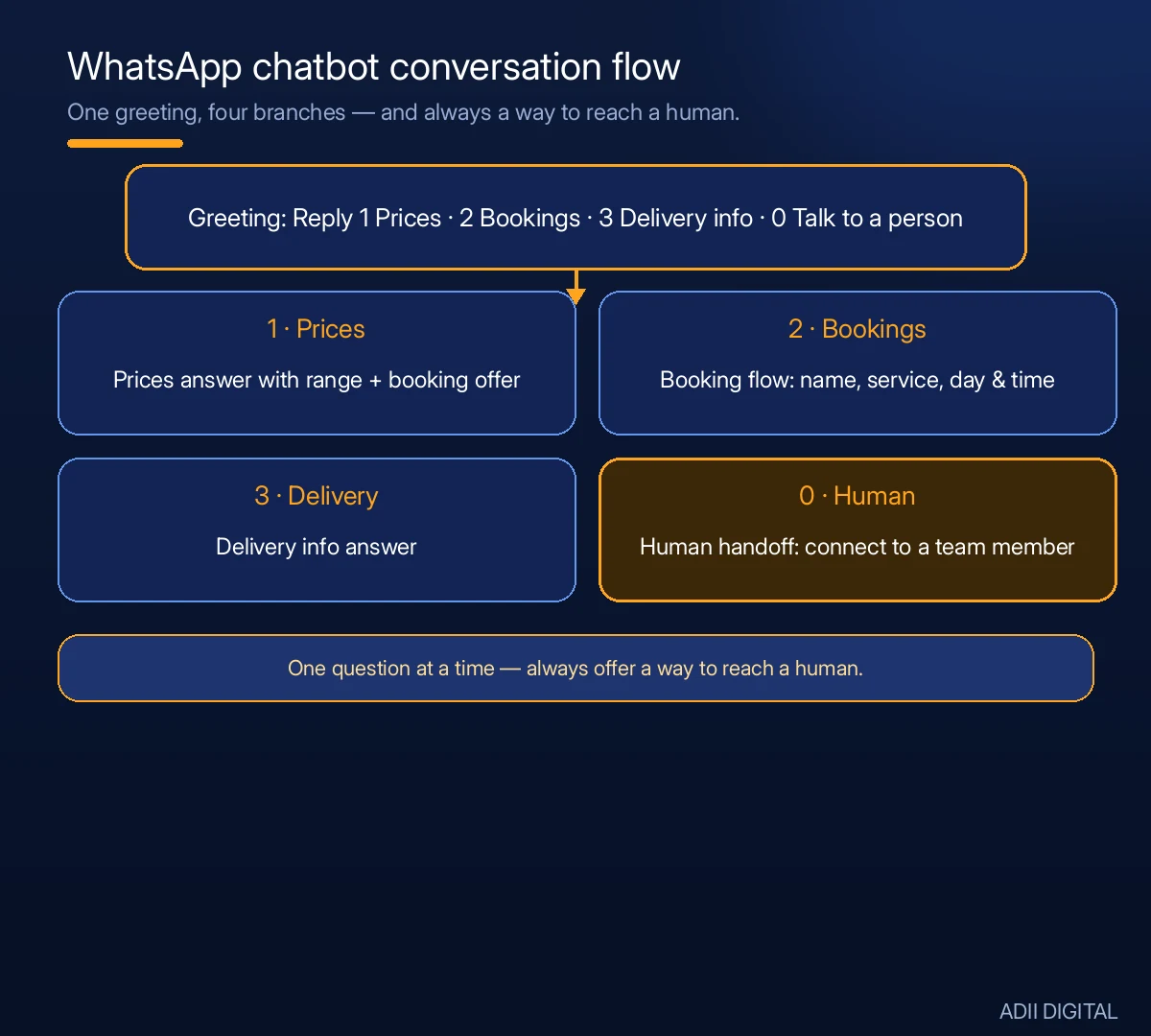
Use these as starting points and rewrite them in your own voice. Replace the bracketed parts with your details.
Greeting flow:
“Hi! Thanks for messaging [Business Name]. I am our automated assistant. Reply 1 for prices, 2 for bookings, 3 for delivery info, or 0 to talk to a person.”
FAQ answer (prices):
“Our [service/product] starts at [price/range]. The final price depends on [size / quantity / location]. Want me to book you in? Reply YES and I will take your details.”
Booking flow:
“Great, let’s book you in. Please reply with: 1) your name, 2) the service you want, 3) your preferred day and time. We will confirm your slot shortly.” If you take a lot of appointments, pair this with an AI appointment booking system so confirmations and reminders go out automatically.
After-hours / away message:
“Thanks for messaging us. We are closed right now and will reply by [time]. If this is urgent, reply URGENT and we will pick it up first thing.”
Human handoff:
“Let me connect you with a team member. Please tell me briefly what you need, and someone will reply during working hours.”
Order update:
“Good news — your order [order number] is confirmed and will be delivered on [date]. Reply TRACK for delivery updates, or 0 to talk to a person.”
Two tips that make a real difference: always offer a way to reach a human (usually “reply 0”), and keep each bot message to one question at a time. Long, multi-question messages are where bots lose people.
What Does a WhatsApp Chatbot Cost?
There are three parts to the cost, and it helps to think of them separately:
- The tool subscription. Free if you stay on the WhatsApp Business app’s basic automation. Paid platforms charge a monthly fee that rises with features, team seats, and message volume.
- WhatsApp’s per-conversation fees. On the API route, Meta charges per conversation, with rates that vary by country and message type. Marketing messages and customer-service messages are priced differently, and rates change — check Meta’s current pricing before you budget.
- Your setup time. Writing good answers, building flows, and testing takes a few hours for a simple bot. That is the cost most people forget, and it is also the part that decides whether the bot actually works.
To keep costs under control, start on the free app, move to a paid platform only when message volume justifies it, and review your usage after the first month. If most of your chats are the same five questions, a small bot is all you need — do not pay for automation you will not use.
Honest Limits to Know Before You Start
Nobody should sell you a chatbot without telling you the limits:
- It costs more than people expect. The tool subscription plus WhatsApp’s per-conversation fees add up. A busy month means a bigger bill. Watch your usage in month one.
- Meta’s rules are strict. You cannot spam people. Marketing messages need pre-approved templates, and customers must opt in. Break the rules and Meta can restrict your number.
- It will misunderstand sometimes. Customers type in slang, mix languages, and ask unexpected things. A good setup always offers a “talk to a human” option.
- Setup takes real thought. The bot is only as good as the answers you write. Garbage in, garbage out.
- It is not a replacement for people. A bot handles routine questions well. Complaints, negotiations, and sensitive situations still need a human — and customers can tell when you pretend otherwise.
Frequently Asked Questions
Is a WhatsApp chatbot free for small business?
The basic WhatsApp Business app is free and includes greeting messages and quick replies. A real chatbot through the WhatsApp Business Platform costs money — a tool subscription plus WhatsApp’s per-conversation fees. Expect to pay something once you go beyond the basics.
Do I need a separate phone number for a WhatsApp chatbot?
Yes, if you use the API route. The number connected to the platform cannot also run the regular WhatsApp app. Many businesses use a second SIM or a virtual number for the chatbot, keeping their personal number separate.
Will customers know they are talking to a bot?
They usually can tell, and that is fine. Be upfront — a greeting like “Hi! I am the automated assistant for [your business]” builds trust. Customers do not mind bots. They mind bots that pretend to be human and then fail.
Can a WhatsApp chatbot take payments?
In some countries, WhatsApp supports in-chat payments. Elsewhere, the bot can send a payment link and confirm once paid. Check what is available in your country, because this changes by region.
What happens when the chatbot cannot answer?
A good setup hands the conversation to you or your team. Make sure your tool supports this handoff, and that someone actually checks the inbox. A bot that traps customers with no human backup is worse than no bot at all.
How long does it take to set up?
The free WhatsApp Business app setup can be done the same day. A simple platform chatbot usually takes a few days once you have written your answers and tested the flows. Booking, order, or payment flows take longer — start simple and add them after the basics work.
The Bottom Line
A WhatsApp chatbot for small business can save a small team real time — because it meets your customers where they already are and handles the questions you answer every day. Start free with the Business app, write down your real FAQs, and upgrade to a proper platform when the message volume justifies it. Keep a human in the loop, follow Meta’s rules, and watch the costs.
WhatsApp is only one piece of the picture. For more ideas, see these AI automation examples for small business.
Want it set up properly? We build WhatsApp chatbots for small businesses — greeting flows, FAQ answers, booking and order capture, and smooth handoff to your team, tested before we hand over the keys. See our AI automation services →